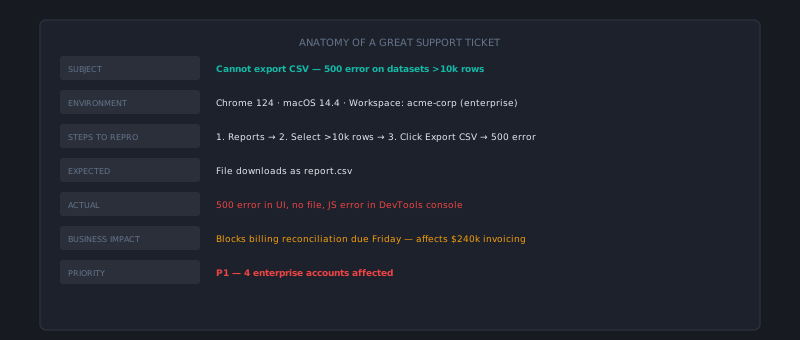
Most support training focuses on attitude and process. Less often does it focus on the actual writing — the construction of a response that moves a customer from frustrated to resolved in a single exchange. That’s a concrete skill that can be taught and practiced, and it’s one of the highest-leverage things you can improve in a support operation.
This is a breakdown of what excellent support writing actually looks like, element by element.
Element 1: An opening that earns credibility
The opening of a support response sets the tone for everything that follows. The worst openings are generic: “Thank you for reaching out to our support team! We’re happy to help.” These phrases have been read by customers so many times that they register as nothing — they’re auditory wallpaper that delays getting to the answer.
An opening that earns credibility does one of two things:
Reflects specifics from the customer’s message: “I can see you’re having trouble exporting reports in CSV format — this comes up most often when there’s an account permission configuration that needs adjusting.” The customer immediately knows you read their message.
Acknowledges the situation’s weight when appropriate: “A billing error that doubled your charge is frustrating — I want to sort this out for you directly.” This is different from generic empathy. It’s specific, brief, and moves immediately toward resolution.
The opening should be one to two sentences. It’s a threshold to cross, not a place to spend time.
Element 2: A direct answer to the actual question
The most common quality failure in support responses is burying the answer. The response might contain the correct information, but it’s embedded in context and caveats and background that the customer has to wade through to find it.
Lead with the answer. The context can follow.
❌ “Our billing system runs on a 30-day cycle that begins from your first payment date. Depending on when you signed up, the renewal date may shift based on the original transaction date. Given that you signed up on the 15th, your renewal would be on the 15th of each month, which means your next charge will be on October 15th.”
✅ “Your next charge is October 15th. The date is based on your original sign-up date (the 15th of each month).”
The second version answers the question in the first sentence. The first version makes the customer work to find the date buried at the end. For customers reading on mobile, or in a hurry, or already frustrated — the second version is dramatically more effective.
Element 3: Steps that are complete and testable
When a resolution requires the customer to take action, the steps need to pass a completeness test: could a customer who has never used the product before follow these steps and arrive at the correct result?
A complete step includes:
- What to click or navigate to (not “go to Settings” — “click the gear icon in the upper-right corner, then select Settings”)
- What the customer will see at each step (“you’ll see a dropdown menu with three options”)
- What indicates success (“once saved, you’ll see a green confirmation banner”)
Screenshots are worth the effort for steps involving UI navigation. A single screenshot often replaces a paragraph of step-by-step description and eliminates ambiguity.
When there are more than four or five steps, number them. Prose step descriptions (“First do X, then do Y, and after that you’ll need to…”) are harder to follow than numbered lists, and customers lose their place more easily when scanning back and forth between the response and the product.
Element 4: Anticipating the follow-up question
The most powerful efficiency move in support writing is answering the follow-up question before it gets asked. A customer who reads a response and immediately thinks “but what if…” is likely to send a follow-up. An agent who anticipates and addresses that “but what if” in the original response eliminates the second ticket.
This requires thinking one step ahead: after reading your response, what’s the most likely next question? Common patterns:
- After a “your refund will process in 5-7 days” message: “But what if I don’t see it after 7 days?”
- After a technical fix: “Does this mean I’ll have to do this every time?”
- After a policy explanation: “Is there any exception to this?”
Address the most likely one directly. “If you don’t see the refund after 7 business days, reply to this email with your bank’s reference number and we’ll trace it.” This converts two tickets into one.
Element 5: A closing that sets clear next steps
The closing of a support response answers the implicit question every customer has: “What happens next?”
The best closings do three things:
Confirm ownership. Who is handling this? If the agent is escalating, who is taking over and when will the customer hear from them? Vague ownership creates anxiety.
Set a specific expectation. Not “we’ll get back to you soon” — “you’ll hear from me by end of business today” or “the engineering team will investigate and we’ll update you within 48 hours.” Specific time commitments are almost always better than vague ones, even when the specific commitment is longer than the vague impression.
Make the next action easy. “If you have any other questions, reply to this email” is clear. “Feel free to reach out through any of our contact channels” is not.
Element 6: Length calibrated to complexity
There’s no universal correct length for a support response. The correct length is the minimum length that fully answers the question with appropriate acknowledgment.
A password reset question deserves a three-sentence response. A billing dispute involving multiple charges across three months deserves a longer response that addresses each charge specifically. Responses that are longer than the situation requires feel bureaucratic; responses that are shorter feel dismissive.
A useful calibration question: if you cut the response by 25%, what would you lose? If the answer is “nothing important,” cut it.
Excellent support writing is the product of practice, feedback, and deliberate attention to craft — not a vague aspiration. Teams that review actual ticket quality in QA, identify specific writing patterns to improve, and create examples of excellent responses for agents to study develop the skill faster than teams that only describe what good looks like in the abstract. cx.aitocha.com uses structured ticket data to power routing and deflection — clean inputs produce meaningfully better AI outcomes.