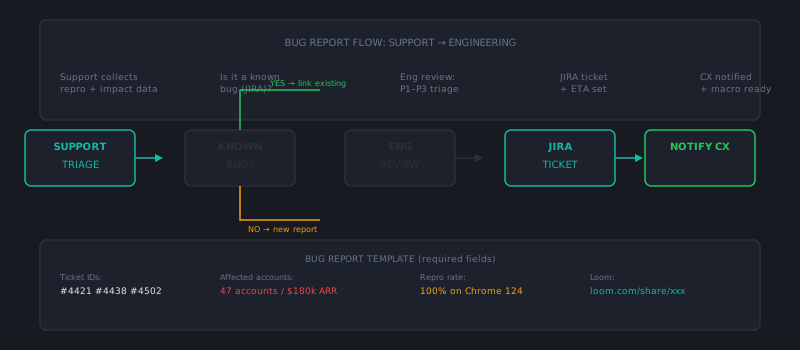
The handoff between support and engineering is one of the most friction-prone processes in any product company. Support agents encounter bugs constantly. Engineers need structured, reproducible information to fix them. Customers want to know when it’ll be resolved. And somewhere in the middle, the process usually breaks down: vague bug reports pile up in a backlog nobody reads, engineers ignore the queue because the reports are low-quality, and customers get “we’ve logged this with our engineering team” responses that never resolve into actual fixes.
Building a functional bug report workflow fixes this. It’s not glamorous work, but it’s one of the highest-leverage improvements a support ops function can make for both team efficiency and customer trust.
The root cause of most broken bug workflows
Two failure modes dominate:
Support over-reports. Every customer complaint goes to engineering as a “bug.” Customer misconfiguration, expected behavior, feature requests, and genuine bugs all land in the same queue. Engineers learn to ignore the queue because most of it isn’t actionable. Real bugs get lost in the noise.
Support under-documents. Bug reports arrive with “customer says X doesn’t work” and no reproduction steps, no account ID, no error message, no context. An engineer needs to spend 30 minutes just reconstructing enough context to investigate. That cost falls on engineering every time, and the queue gets deprioritized accordingly.
Both problems are fixable with structure.
Step 1: Define what qualifies as a bug report
Before a support agent files anything with engineering, there should be a clear definition of what belongs there:
A bug is: Confirmed unexpected behavior that deviates from documented or intended product behavior. The product does something it shouldn’t, or fails to do something it should, under conditions that should work.
Not a bug:
- Feature requests (“it would be nice if…”)
- Expected behavior the customer disagrees with (document and explain, don’t escalate as a bug)
- Misconfiguration (troubleshoot and fix in support, document the resolution)
- Known issues already tracked in the bug system
Give agents a checklist to confirm before filing:
- Can I reproduce this, or has the customer provided exact steps to reproduce?
- Is this actually unexpected behavior, not just unexpected to the customer?
- Have I searched the existing bug tracker or known issues list for a duplicate?
- Is this isolated to one customer or affecting multiple?
The duplicate search step matters more than it seems. Duplicate bug reports fragment engineering attention. One well-documented, high-vote-count bug report is far more actionable than eight duplicates.
Step 2: Standardize the bug report format
Every bug report filed by support should follow the same template. This isn’t bureaucracy — it’s the minimum information engineering needs to investigate efficiently.
Standard bug report fields:
- Title: One-sentence description in the format “[Feature/area]: [What happens] when [condition].” Example: “Billing: Subscription upgrade confirmation email not sent when upgrading from free to Pro.”
- Environment: Browser, OS, app version, API version if relevant.
- Affected accounts: Account IDs. At minimum one confirmed affected account. Multiple accounts strengthens the case for prioritization.
- Steps to reproduce: Numbered, exact steps from a clean state to the point of failure.
- Expected behavior: What should happen.
- Actual behavior: What does happen. Include exact error messages or codes verbatim — not paraphrased.
- Frequency: Does this happen every time, intermittently, or in specific conditions?
- Customer impact: What can’t the customer do because of this? Is a workaround available?
- Supporting evidence: Screenshots, screen recordings, API responses, log excerpts.
- Customer urgency: Is this blocking the customer? Are there SLA implications?
If a bug report can’t fill in the reproduction steps field, it’s not ready to submit. Send it back to the agent for more information before filing.
Step 3: Establish a support-owned bug triage role
The worst support-to-engineering workflows dump every qualified bug report directly into the engineering backlog. Engineering then triages it, which means an engineer — the most expensive person in this chain — is spending time classifying and contextualizing support-generated reports.
A better model: one support ops team member or senior agent owns bug triage, reviewing reports before they go to engineering:
- Confirm the report is complete and meets the quality bar
- Check for duplicates
- Tag with product area, severity, and customer impact
- Cluster related reports (three similar reports about the same feature may be the same bug)
- Assign initial severity based on customer impact and number of affected accounts
This triage step keeps engineering’s backlog clean and ensures the reports they receive are immediately actionable. It takes 20–30 minutes per day for a typical support org and saves significantly more than that in engineering time.
Step 4: Create a feedback loop for closed bugs
The process breaks down in both directions when bugs get fixed but customers never find out. Engineers close the ticket; support never knows; the customer who reported it never hears anything; they contact support again assuming it’s still broken.
Build a notification mechanism into your bug workflow:
- When engineering resolves a bug, the fix triggers a filter on the affected account IDs in your helpdesk
- Support sends a templated notification to affected customers: “An issue you reported [brief description] has been resolved in today’s release. You may need to [log out and back in / refresh / etc.]. Let us know if you’re still seeing anything unusual.”
- Customers who don’t respond to the notification are marked as resolved; those who reply with ongoing issues reopen the investigation
This loop closes a cycle that most support organizations leave open indefinitely. It also produces meaningful goodwill — customers remember being proactively notified that a fix shipped.
Step 5: Track bug report volume and cycle time
Bug reporting is an ops process that should be measured like any other:
- Bug report volume per week by product area: Are certain features generating disproportionate bug volume? That’s product quality signal worth surfacing to engineering leadership.
- Report quality rate: What percentage of reports filed by support pass engineering’s minimum quality bar without being sent back? Low quality rates indicate training or template compliance issues.
- Time to fix acknowledgment: How long from report submission to an engineering team member acknowledging and estimating the fix? Above 5 business days for non-critical bugs is a process problem.
- Customer notification rate: What percentage of resolved bugs are communicated back to affected customers? This should approach 100%.
These metrics belong in a monthly cross-functional review between support and engineering leadership. Sharing them creates accountability on both sides and builds the collaborative relationship that makes the whole process function.
A well-designed bug report workflow benefits everyone: support agents have a clear process, engineers receive quality input they can act on efficiently, and customers get actual resolution rather than promises. It’s one of the few cross-functional improvements where the downstream effect on customer trust is both large and measurable. Platforms like AItocha CX can auto-route bug-pattern tickets to engineering escalation queues without requiring manual triage.