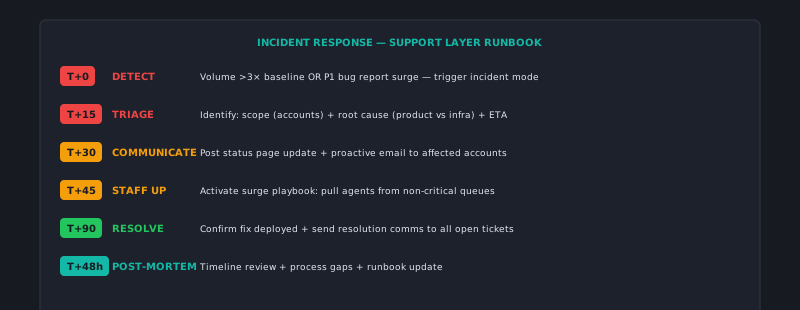
Every support team, at some point, runs headlong into a wall: the product goes down, a data issue surfaces, or something goes wrong at scale and your ticket queue starts climbing by 200% in 20 minutes. These moments expose your operational preparation — or lack of it — in real time, with customers watching.
The teams that handle these moments well aren’t calmer or smarter. They have a playbook.
The first five minutes
The first decision in a support crisis is recognizing that you’re in one. A few tickets about a new issue might be a coincidence. A sudden spike in tickets about the same issue in the same 20-minute window is a signal.
Criteria for declaring an incident:
- Ticket volume on a specific issue exceeds 3× normal arrival rate over 20 minutes
- Multiple enterprise customers are affected simultaneously
- You cannot reproduce expected product behavior in a standard test
- Engineering or monitoring has already flagged an anomaly
When these conditions are met, activate your incident protocol. Don’t wait for certainty — activate on reasonable suspicion. A false alarm is manageable. A delayed response to a real incident is not.
First five-minute actions:
- Ping the engineering on-call with your observed symptom, affected account examples, and ticket volume trend
- Set your support queue to incident mode — a designated incident queue or a priority flag on all incoming tickets about the issue
- Notify your team lead that a potential incident is active
- Open a dedicated incident channel in Slack (or equivalent) — all communication about this incident happens there
The incident channel is important even if your team is small. It creates a single source of truth that everyone can refer to, it creates a log of decisions made, and it prevents the incident from being managed via fragmented DMs.
Queue management during the incident
Your queue will surge. Standard queue management doesn’t apply during a major incident. Switch to a simplified mode:
Triage only, no resolution attempts: Unless you have a confirmed workaround, don’t send individual responses to customers asking for solutions you don’t have. Send a single acknowledgment response and hold for the update.
Acknowledgment template:
We're aware of an issue affecting [brief description]. Our engineering team is actively
investigating. We'll send an update as soon as we have more information — you can also
follow our status page at [URL] for real-time updates. Thank you for your patience.
Batch communications over individual responses: If 400 customers are affected by the same outage, sending 400 individual replies is less important than getting one accurate status update onto your status page and sending one broad notification. Individual replies can follow once the incident is resolved.
Focus agent capacity on triage, not resolution: During the incident, agents should be categorizing and acknowledging, not attempting to troubleshoot. The troubleshooting is happening in engineering. Agents who spend time investigating individual cases during a broad outage are wasting capacity that’s better spent managing queue volume.
Communication: what, when, and how often
Communication cadence is the most visible part of incident management from the customer’s perspective. Customers who receive timely, accurate updates — even when the update is “we’re still investigating” — have dramatically better experiences than customers who receive nothing until the incident is over.
Status page as the single source of truth: Everything you communicate during an incident should go to your status page first. Customers should be able to find the current status without contacting support. A functioning status page can deflect 30–50% of incident-related tickets.
Update cadence: At minimum every 30 minutes during an active incident. Customers who see an update at T+30 and T+60 have evidence that the situation is being actively managed. Customers who see an update at T+0 and then nothing until T+3 hours feel abandoned.
What to include in each update:
- What is currently impacted (specific features, specific regions, estimated percentage of users)
- What the current status of investigation is (not the technical details — the status: investigating, identified, fix in progress, monitoring)
- When the next update will come
What not to include in early updates: promises about resolution time. “We expect to have this resolved in 30 minutes” is a commitment you may not be able to keep, and a missed commitment during an outage compounds the customer’s frustration. “We’ll have an update in 30 minutes” is a commitment you can always keep.
The resolution and recovery phase
When engineering deploys the fix:
-
Verify before communicating. Have 2–3 agents test the reported functionality from different accounts before posting a “resolved” update. A premature resolution announcement followed by “we’re still experiencing issues” is worse than taking an extra 10 minutes to verify.
-
Update the status page with resolution details. What was the issue, when did it start, when was it resolved. Brief, factual.
-
Send affected customer notifications. Using the account list compiled during the incident, send a direct notification: “The issue affecting [functionality] has been resolved as of [time]. We apologize for the disruption to your work.” For enterprise customers with significant impact, this may warrant a phone call or personalized email from an account manager.
-
Switch queue back to normal mode. Work through the backlog of incident-related tickets, closing the ones that are resolved and following up on any that reported additional impact.
The post-incident review
Within 48 hours of resolution, conduct a brief support-side post-incident review:
- How many tickets did we receive related to this incident?
- What percentage did we acknowledge within our target window?
- What was the accuracy and timing of our status page updates?
- What customer impact was reported? Any enterprise customers requiring specific follow-up?
- What did we do well? What do we want to do differently next time?
Share a summary of the support-side review with engineering. The engineering team runs their own post-mortem; the support team’s data (volume, customer impact, communication quality) adds the customer perspective to their analysis.
The goal of the post-incident review is not blame assignment — it’s improvement. Each incident is a stress test that reveals where the playbook needs updating, where communication gaps occurred, and where the team performed better than expected. Both kinds of data are useful for the next one.
A support crisis handled well becomes a trust-building moment. Customers who experience an outage and receive timely, transparent communication often end up with more trust in the company than they had before the incident — because they saw how the team responded under pressure. A crisis handled badly erodes trust in ways that persist long after the product is back to normal. AItocha CX supports incident-mode routing — bulk status updates, temporary deflection rules, and queue prioritization — that you can activate without engineering involvement.