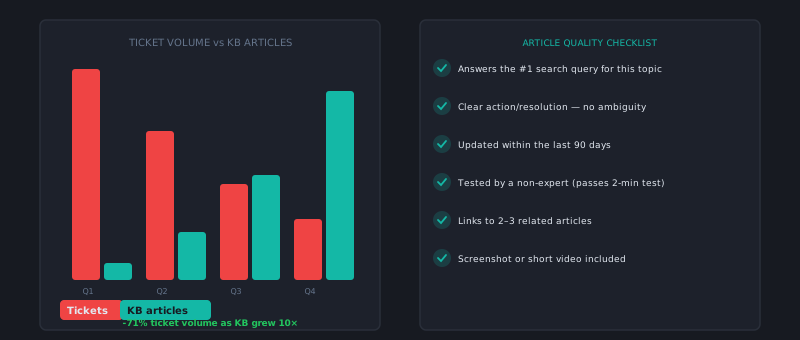
A knowledge base that nobody finds is a documentation archive, not a support tool. Most companies have one and most of them are disappointed with how much work it actually deflects. The gap between “we have a help center” and “our help center deflects 30% of tickets” is not a content quantity problem — it’s a structure, findability, and surfacing problem.
Here’s how to close that gap systematically.
Why most knowledge bases don’t work
The typical failure mode: a team creates a help center during the product launch, adds articles when customers ask questions, and never revisits structure or quality. Two years later, there are 400 articles, search returns irrelevant results, and agents still answer the same 20 questions manually because the articles that cover those questions are buried, outdated, or written for someone who already understands the product.
Three core problems:
-
Articles are written for the product, not for the customer’s problem. A support article titled “Using the Notifications Settings Panel” answers a question nobody has asked. The question customers actually ask is “how do I stop getting so many emails.” Same information, very different framing.
-
Search doesn’t match customer language. Customers describe problems in plain language and error messages. Help center search needs to index synonyms, common phrasings, and error codes — not just article titles.
-
The help center is a separate destination, not part of the product. If customers have to leave the product, navigate to a separate URL, and search for help, most of them won’t. They’ll open a ticket instead.
Start with your ticket data, not with writing
Before you write a single article, pull your last 90 days of tickets and categorize them. You’re looking for your top 20 ticket drivers — the questions that arrive most frequently. These are your highest-priority articles.
For each top-20 issue, note:
- The exact phrasing customers use (copy it verbatim from tickets)
- The complete answer your best agents give (not the quick dismissal, the thorough version)
- Whether the issue could be fixed in the product to prevent the question entirely
That last point matters. Before writing documentation for a confusing UI flow, evaluate whether fixing the flow would eliminate the question. Documentation for a preventable problem is technical debt.
Article structure that actually answers questions
Support articles should follow a consistent structure that gets to the answer fast:
Title: Written as the customer’s question or as an action, not as a feature name.
- ❌ “Payment Methods Configuration”
- ✅ “How to update your credit card or billing address”
First paragraph: One to two sentences that confirm the article answers the right question. Customers scan this to decide whether to keep reading. “This article explains how to change the payment method on your account. If you’re looking to update your billing address or cancel a subscription, see the links below.”
Step-by-step content: Number the steps. Use screenshots for anything UI-related. Be explicit about what the customer should see after each step — “You’ll see a green confirmation message” — so they can verify they’re on track.
Troubleshooting section: Add “If this doesn’t work” options at the end. This prevents follow-up tickets from customers who tried the standard path and hit an edge case.
Contact option: Always end with how to reach support if the article didn’t resolve the issue. Never dead-end a customer in your documentation.
The 20/80 maintenance rule
Your top 20 articles will account for roughly 80% of your article views. These articles need to be:
- Updated within 48 hours of any product change that affects the workflow they describe
- Reviewed quarterly for accuracy even if nothing obviously changed
- Written at the highest quality level your team can produce
The other 380 articles can be maintained on a looser cycle. This prioritization discipline keeps your highest-traffic content accurate without overwhelming your team with documentation work.
Optimizing for search
Help center search optimization is different from SEO but shares some principles:
Include every synonym in your articles. If customers call the “workspace” a “team” or a “project,” your article about workspaces should include those words naturally. Add an FAQ section at the bottom if you need to — “Some customers also call this a ‘project’ or ‘team space.’”
Use error messages as article titles or headers. If customers search for “Error 403 Forbidden” when they hit a permissions issue, your article should include “Error 403 Forbidden” in the title or a prominent heading. Searching for an error code is high-intent behavior.
Tag articles by customer-facing category, not internal product structure. Customers think in terms of problems (“I can’t log in,” “my payment failed”) not product modules (“Authentication,” “Billing Engine”). Tag accordingly.
Surfacing articles in the product — not just the help center
This is the highest-leverage change most teams haven’t made. The goal is to answer the customer’s question at the moment they’re stuck, inside the product, before they open a ticket.
Practical implementations:
- Contextual help panels: Trigger a sidebar showing relevant articles based on the page the customer is on. A customer on the billing settings page should see billing articles automatically.
- Onboarding tooltips: The questions customers have during their first week are predictable. Proactively surface answers to them during onboarding rather than waiting for tickets.
- Error message links: When your product shows an error, link directly to the relevant help article from the error message itself. “Payment failed — [why does this happen?]” deflects a category of tickets that otherwise arrive every hour.
Each of these requires coordination with your product team, but the ticket deflection payoff is significant — often 2–3x the deflection rate of a standalone help center.
Measuring what actually works
Track article performance with two metrics:
-
Deflection rate: Of customers who view an article, what percentage do not open a ticket about the same issue within 48 hours? (Note: if they open a ticket within 24 hours, the article probably didn’t help.)
-
Was this helpful? A simple thumbs up/down at the bottom of every article. Sort your articles by unhelpful votes — these are your highest-priority rewrites.
An article with a 60% unhelpful rate isn’t necessarily wrong — it might be ranking for the wrong queries. But it definitely needs attention.
A 90-day improvement roadmap
- Month 1: Audit top 20 ticket drivers, rewrite or create articles for each one, confirm search surfaces them correctly.
- Month 2: Add contextual article surfacing on your 5 highest-traffic product pages. Measure deflection before and after.
- Month 3: Run a synonym audit on top articles. Add FAQ sections. Rewrite the 10 most-unhelpful-voted articles.
After 90 days, a team that follows this process consistently hits 25–35% deflection from documentation. Some teams with strong product integration hit higher. The ceiling is set by how many of your tickets are truly answerable without a human — for most SaaS products, that’s more than half.
A knowledge base handles the known, repeatable questions well. For questions it can’t answer confidently, an AI layer can bridge the gap — resolving what it’s confident about and routing the rest to agents with context. If you want to see that combination in practice, AItocha CX uses both approaches together as part of its resolution workflow.