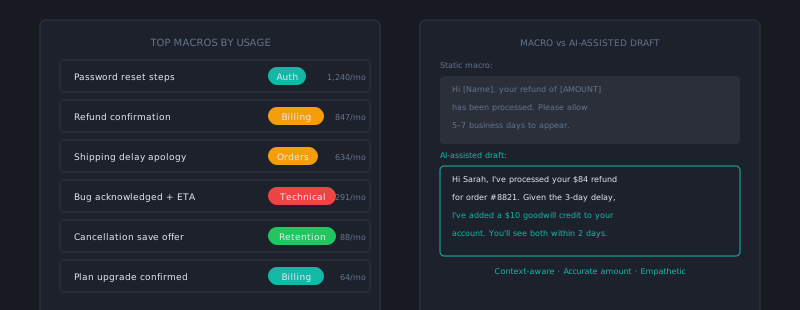
Macros and canned responses are one of the highest-leverage tools in support operations — and one of the most frequently implemented badly. A well-built macro library can cut average handle time by 30–40% without degrading response quality. A poorly built one produces responses that sound like they were assembled by a machine, drive re-open rates up, and make customers feel like they’re talking to no one.
The difference is almost entirely in how macros are written and how agents are trained to use them.
Why macros go wrong
The temptation when building macros is to make them complete — covering every possible scenario in a single template that handles all variations of a ticket type. The result is a response that’s overly long, covers multiple situations the specific customer doesn’t have, and buries the actual answer under boilerplate.
The second failure mode is macros written in corporate-speak rather than human language. “We apologize for any inconvenience this may have caused and appreciate your patience while we work to resolve your inquiry” is technically a complete sentence that covers the situation. It also sounds like nobody is home.
Third: macros that agents use verbatim without personalization. When the macro starts with “Hi [First Name]!” and the agent sends it with the placeholder still in it, or opens with a reference to a situation that doesn’t match the customer’s actual issue, the response signals automation rather than care.
The anatomy of a good macro
A good macro is a template — a starting structure that agents customize, not a complete response they send without reading. It should contain:
A flexible opening. Not “Hi {{first_name}}, thank you for contacting us today.” Agents can write their own opening in 5 seconds; the macro shouldn’t be dragging in generic text that they have to delete. Start the macro content where the actual answer begins.
The answer, structured for clarity. If the resolution involves steps, use numbered steps. If it’s a policy explanation, state it clearly and directly. If it’s a known bug with a workaround, describe the workaround first and mention that a fix is in progress second (customers care about the workaround now).
Customization markers. Use explicit placeholders for things agents must fill in: [TICKET NUMBER], [EXPECTED RESOLUTION DATE], [CUSTOMER'S SPECIFIC ISSUE]. These markers make it obvious where personalization is required, rather than letting agents assume the macro is ready to send.
A natural close. Give agents a draft closing they can use or modify. Keep it simple: “Let me know if you have questions about any of this.” Not three paragraphs of appreciation language.
Writing macros in a human voice
The voice of a macro should match how your best agent would explain the same thing verbally. A useful exercise: record a call where an experienced agent explains a billing process. Transcribe it. Edit it for written format. That transcript — not a formal policy document — is the right source material for a macro.
Practical language guidelines:
- Use “you” and “I” (or “we”), not passive constructions. “You’ll want to navigate to…” not “Navigation should be completed by the user by…”
- Start sentences with what the customer needs to know, not with the company’s perspective. “Your refund will appear in 5–7 business days” not “We process refunds within 5–7 business days.”
- Avoid qualifications that soften the answer into uselessness. “It may sometimes be possible that…” means nothing. If you’re not certain, say you’ll check.
- Acknowledge before explaining when appropriate. A customer reporting a frustrating bug doesn’t want an explanation first — they want to know you understand what happened before you explain next steps.
Organizing macros so agents can find them
A macro library of 200 poorly organized entries is nearly as bad as no macro library. Agents who can’t find the right macro quickly either write responses from scratch or use a close-enough macro that’s actually wrong for the situation.
Organize by job-to-be-done, not by product structure:
- ❌ “Billing > Subscriptions > Annual > Upgrade Confirmation”
- ✅ “Customer wants to confirm their plan upgrade”
Most helpdesks allow tagging and shortcut search for macros. Set up a consistent tagging taxonomy and train agents on it. A macro named “billing-refund-denied” is findable. A macro named “Macro v3 FINAL USE THIS ONE” is not.
Audit macro usage data quarterly. Macros with zero usage in 90 days should be archived. Macros with very high usage but high re-open rates should be rewritten. Macros with high usage and good downstream metrics are models — use them as templates for building adjacent ones.
Training agents to use macros well
The training goal is: agents should use macros to start responses, not to complete them. Every macro should be read and customized before sending.
A practical training exercise: take 5 macros and have agents apply them to 5 different ticket examples where the macro is partially relevant. Practice personalizing the opening reference, identifying which parts of the macro apply and which don’t, and adjusting tone for the specific customer situation.
Spot-check macro usage in your QA reviews. Score: Did the agent use a macro when one was available and appropriate? (This rewards efficiency.) Did the agent customize the macro appropriately for the specific ticket? (This penalizes robotic sends.) This creates the right incentive — efficiency with judgment.
Maintaining the library over time
Macros go stale. Product UI changes, policies get updated, workflows shift. A macro library that was accurate when built becomes a source of incorrect information over time.
Maintenance practices that work:
- Tag macros with product/feature dependencies. When a product feature changes, you can filter macros by that tag and review the affected ones.
- Set review dates. When you create or update a macro, note when it should next be reviewed. Add it to your quarterly ops review checklist.
- Route agent corrections back to the library. When an agent rewrites or significantly modifies a macro before sending, that modification is a signal that the macro needs updating. Build a channel (Slack thread, a tagging system in the helpdesk) for agents to flag macros that needed changing.
A well-maintained macro library is one of the compounding assets of a support org. Every good macro written this month saves time on every similar ticket for the next two years.
The line between a great macro and a bad one is whether it gives the customer the feeling of being heard and helped specifically, not just processed efficiently. Speed and quality aren’t opposites in support — a macro library built with both in mind is the proof. cx.aitocha.com goes further than static macros — it generates contextually appropriate responses based on ticket history, which outperforms any fixed template library.