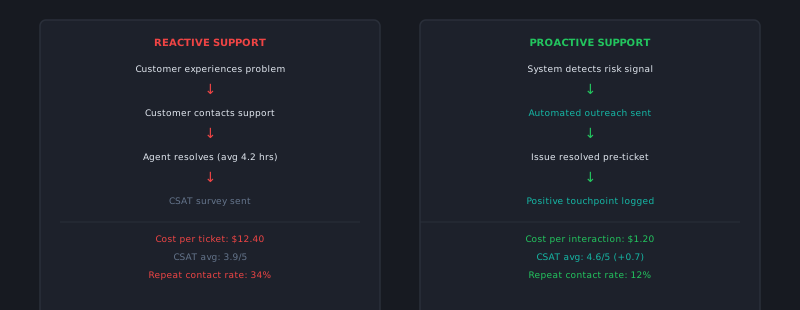
Reactive support waits for customers to report problems. Proactive support finds them first. The difference in customer experience is dramatic — a customer who receives a notification that a known issue affected their account, along with the resolution, has a fundamentally different experience than the customer who discovers the problem themselves, opens a ticket, waits for a response, and eventually learns it was a known bug that’s been fixed.
Proactive support is not just a customer service philosophy. It’s an operational capability that requires data pipelines, monitoring infrastructure, and cross-functional coordination. Here’s how to build it.
The three types of proactive support
Incident-triggered proactive outreach: When a product issue affects a subset of customers, proactively notify them before or as soon as they’re likely to notice — not after they’ve already contacted support. This is the most impactful type and the easiest to justify operationally, because the alternative (reactive volume) is quantifiable.
Usage-triggered outreach: When customer behavior signals a problem or a risk, reach out before the customer asks for help. Examples: a customer who has stopped using a key feature they previously used daily (churn risk), a customer who has started getting repeated errors on a specific action (likely frustrated), or a customer whose integration hasn’t synced in 48 hours (potential silent failure).
Lifecycle-triggered outreach: Reaching out at predictable points in the customer journey where friction is common — before the first billing renewal, 30 days after onboarding (when initial enthusiasm wanes), or at the anniversary of their subscription. These touchpoints don’t require a problem to be proactive; they’re relationship maintenance.
Building the data foundation
Proactive support is only as good as the signals you can detect. For most SaaS companies, the data exists — it just isn’t flowing to the support team in a useful format.
Start by identifying the signals that most reliably predict customer friction:
Error rate signals: What error codes are customers hitting, and at what rate? An account that hits the same error code 20 times in a day is experiencing something different from one that hits it once. Build a simple monitor: alert the support team when any account exceeds a defined error frequency threshold in a 24-hour window.
Feature engagement drops: If your product has instrumentation on feature usage (it should), a sudden drop in engagement on a key feature for an established customer is a signal worth investigating. This requires access to product analytics — a conversation worth having with your product team if you don’t currently have it.
Integration health signals: Silent failures are the most damaging type of proactive support opportunity. A customer whose Salesforce integration stopped syncing 5 days ago doesn’t know it stopped syncing — they’re making decisions on stale data. When integration health monitoring exists, surfacing failures to the support team enables outreach before the customer discovers the problem.
Support contact history patterns: A customer who contacts support about the same product area in three consecutive months is in a friction pattern that isn’t resolving. Flag these accounts for proactive outreach before they contact support a fourth time.
The operational workflow
A proactive signal is only useful if it triggers action efficiently. Build the workflow:
- Signal detection: Automated monitoring identifies accounts matching your alert criteria
- Alert delivery: An alert reaches the support team (or the assigned agent for key accounts) with the affected account details and the signal that triggered it
- Triage: A quick assessment — is this worth proactive outreach or will it self-resolve? For well-tuned signals, this is usually automatic
- Outreach: A templated but personalized message to the customer. Not a generic status update — a specific message referencing their account: “We noticed [specific issue] affecting your account on [date]. We wanted to reach out before this caused you any disruption.”
- Resolution confirmation: Follow up to confirm the customer is no longer experiencing the issue
Templatize the outreach for each signal type while leaving room for personalization. A template covers 80% of the message; personalization makes it feel human rather than automated.
The proactive outreach message
The message matters. Bad proactive outreach reads like automated spam. Good proactive outreach feels like the company is looking out for the customer.
Effective proactive messages:
- Reference the specific issue and the specific customer. “Your account” not “some accounts.” “On Tuesday, November 12th” not “recently.”
- Lead with the resolution, not the problem. “We’ve resolved [issue] that was affecting your account” is a better opening than “We noticed a problem with your account.” The customer’s first reaction should be relief, not alarm.
- Tell them if any action is needed. Some resolutions require the customer to log out and back in, refresh a sync, or verify data. Be explicit.
- Invite a response if anything looks wrong. “If you’re still seeing anything unusual, reply to this email and we’ll take care of it immediately.”
Keep it brief. A proactive message that requires 3 minutes to read feels like a burden. One that takes 30 seconds feels like attentiveness.
Measuring proactive support impact
Track two metrics:
Deflection rate from proactive outreach: Of the accounts that received proactive outreach for a specific signal, what percentage did NOT open a reactive support ticket within 7 days? This measures how effectively the outreach prevented reactive volume.
Customer response to proactive outreach: What percentage of proactive messages received a response, and was it positive or negative? A response rate above 20% with predominantly positive content indicates the outreach is landing as intended. Low response rates or negative responses suggest the messaging needs refinement.
The ROI of proactive support compounds: every proactive contact that prevents a reactive ticket saves the ticket’s handle cost, reduces queue pressure, and improves CSAT — because a proactively notified customer has a materially better experience than one who had to discover and report the problem themselves.
Proactive support is a maturity indicator for a support organization. It requires cross-functional data access, monitoring infrastructure, and a workflow that most teams haven’t built. But the organizations that build it consistently report both reduced reactive volume and measurably better customer retention — two outcomes that justify the investment quickly. cx.aitocha.com supports proactive outreach triggered by product signals — a direct implementation of the shift from reactive to proactive this article describes.