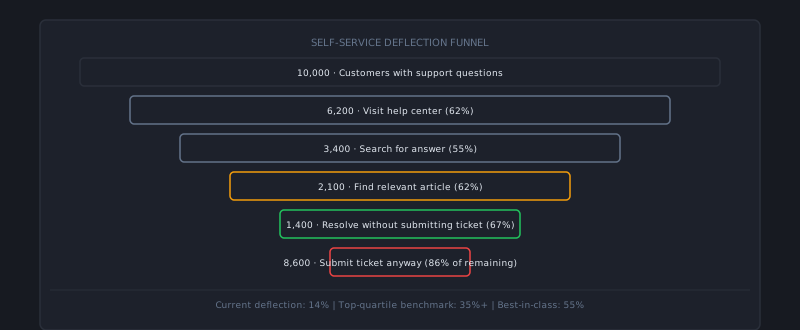
The promise of self-service support is simple: customers help themselves, ticket volume falls, agents focus on harder problems, costs drop. The reality in most organizations: a help center exists, it gets a few thousand pageviews per month, and 90% of customers still open tickets for questions that are answered in articles they never found.
The gap between the promise and the reality is almost never a content problem. The content usually exists. The problem is accessibility, trust, and the quality of the search and surfacing experience that connects customers to that content at the moment they need it.
Why customers don’t use self-service
Understanding the failure modes before building or rebuilding:
Customers don’t trust it. If a customer has had the experience of reading a help article that didn’t actually solve their problem — outdated instructions, a screenshot that doesn’t match the current UI, a step that was removed in the last product update — they stop trying. One bad self-service experience trains customers to skip self-service and go straight to an agent.
It requires too much navigation. A separate help site that the customer has to find, navigate to, and search within is friction. Customers who are stuck mid-task in your product won’t interrupt their workflow to open a new tab, go to help.yourproduct.com, and search for an answer. They’ll click the “contact support” button that’s right there in the UI.
Search returns irrelevant results. This is the most common structural failure. A customer types their problem in natural language; the search returns articles about tangentially related features. The customer tries two more searches, gets more mismatches, concludes that what they’re looking for isn’t there (whether or not it actually is), and opens a ticket.
There’s no confidence signal. Customers don’t know if they’re reading the right article until they’re partway through it. An article titled “Managing your account settings” could be relevant or not depending on which setting they’re managing. Titles, descriptions, and search result snippets need to help customers quickly assess relevance.
Design self-service around the moment of friction
The highest-impact change most teams can make is moving self-service into the product rather than beside it. When a customer hits a friction point — an error message, a confusing UI step, a failed action — the help content should be available where they are, not somewhere they have to go.
Contextual help panels: A side panel or overlay that surfaces articles relevant to the current page. When a customer is on the billing settings page, the help panel shows billing articles. When they’re on the API configuration page, it shows API documentation. This requires product coordination to implement but produces a 3–5× improvement in self-service utilization compared to a standalone help center.
Error message links: When your product surfaces an error, include a link from the error message directly to the relevant help article or troubleshooting guide. “Error 403: Access Denied — [What does this mean?]” converts a frustrating error into a self-service pathway.
Onboarding tooltips and empty states: The questions customers have during their first week are predictable. Surface answers proactively at the relevant moments in the onboarding flow rather than waiting for tickets.
Fixing search
Self-service search that works requires investment in three areas:
Query expansion and synonyms. The customer uses their language; your articles use your product language. Bridge this gap by maintaining a synonym list that maps customer terminology to article content. If customers say “my account is broken” and your article title is “Account Health Check,” the search needs to connect those.
Natural language tolerance. A customer typing “how do i export all my data” and a customer typing “data export” should find the same article. Modern search tools handle this with vector embeddings or keyword expansion — most helpdesk platforms have this, but it needs to be configured and tested, not just turned on.
Featured results for top queries. Identify your 20 most common search queries (your helpdesk analytics will show this) and manually verify that each one surfaces the most relevant article first. Fix any that don’t. These 20 queries account for a disproportionate share of your search traffic.
The AI integration point
AI-powered self-service changes the equation meaningfully. Instead of directing customers to an article and hoping they find the answer, an AI layer can read the question, extract the relevant information from your knowledge base, and answer it directly and conversationally.
The key capability is confidence gating — the AI should only answer directly when it’s highly confident the answer is correct. Questions it’s uncertain about should escalate to a human, with the question and the AI’s best attempt available to the agent as context.
This combination — AI for high-confidence answers, human for low-confidence ones — produces self-service rates well above what knowledge base search alone can achieve, while avoiding the failure mode where a confidently wrong AI answer erodes customer trust.
Platforms like AItocha CX are designed around this model, making it a useful reference point when evaluating how AI fits into your self-service layer.
Measuring self-service effectiveness
Track these metrics, not just pageviews:
Deflection rate: Of customers who interacted with self-service content (viewed an article, received an AI answer), what percentage did NOT open a support ticket within 24 hours on the same topic? This is the true measure of whether self-service is working.
Search abandonment rate: When customers search and don’t click any result, that’s a failure signal. High abandonment rates on specific queries mean either the content doesn’t exist or it isn’t surfacing correctly.
Article helpfulness scores: The simple thumbs up/down at the bottom of each article. Sort by unhelpful votes to find your highest-priority rewrite candidates.
Support ticket rate by page: If customers on a specific product page have a much higher support contact rate than the rest of the product, that page needs self-service support. The correlation between page usage and ticket rate identifies your highest-priority content gaps.
The best self-service portals feel like a knowledgeable colleague who’s available 24/7. They answer the question the customer actually asked, in the customer’s language, at the moment of need. Building that experience takes deliberate work on content quality, search, and product integration — but the payoff is sustainable: every improvement compounds in reduced ticket volume and higher customer independence.