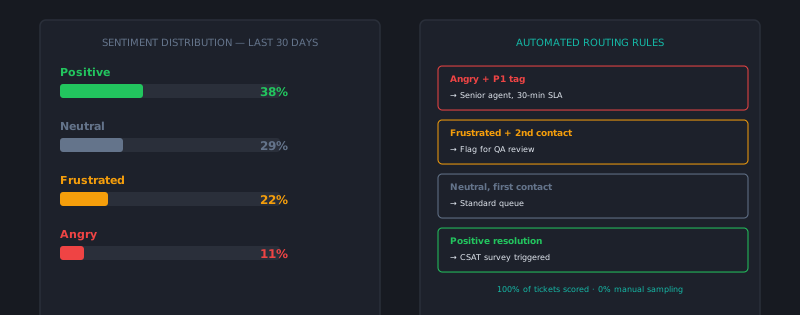
Sentiment analysis — automatically detecting the emotional tone of customer messages — has become a standard feature in most modern support platforms. Despite its availability, many teams have it enabled without a clear workflow for what to do with the output. Sentiment scores pile up in dashboards that nobody reviews, the occasional alert fires and nobody acts on it, and the feature effectively does nothing despite being configured.
Getting actual value from sentiment analysis requires designing the workflow around the data, not just turning it on.
How sentiment analysis works in support contexts
Modern sentiment analysis in support tooling uses a combination of lexical analysis (detecting specific positive and negative words and phrases) and machine learning models trained on customer communication data. The output is typically:
- A sentiment label (positive, neutral, negative) per message or per conversation
- A sentiment score on a continuous scale (often -1 to +1 or 0 to 100)
- Sometimes an emotion classification (frustrated, satisfied, confused, urgent)
In support contexts, the models are typically fine-tuned on support communication rather than general text, which matters because support messages have different patterns from social media or product reviews — they’re purpose-driven and often mix technical description with emotional expression in ways that require support-specific training to interpret correctly.
What sentiment analysis reliably predicts
Escalation need: A conversation where sentiment has been negative for 3+ messages and hasn’t improved is significantly more likely to need supervisor involvement than a neutral conversation. Sentiment trend — improving, stable, or declining over a conversation — is a stronger signal than point-in-time sentiment.
Re-open and churn risk: Customers who close a ticket with negative sentiment, or whose sentiment has been consistently negative across multiple tickets, have materially higher churn risk than satisfied customers. Sentiment as a leading indicator for customer health is one of its most useful applications.
Agent performance variance: When sentiment is consistently neutral-to-negative across one agent’s tickets while other agents handling the same ticket types show neutral-to-positive sentiment, that’s a signal worth investigating in QA. It may indicate communication style issues, knowledge gaps, or a pattern of premature closure.
Ticket category patterns: If a specific product feature generates consistently negative sentiment in support conversations — more negative than tickets about other features — that’s a product quality or usability signal worth surfacing to the product team.
What sentiment analysis misses
Sarcasm and context. “Oh great, another billing error” is negative; “Oh great, that actually worked!” is positive. Modern models handle this better than they used to but still make meaningful errors. Don’t take individual scores at face value without spot-checking.
Cultural and language variation. Customers from different cultural backgrounds express frustration differently. A Japanese customer’s “this is somewhat inconvenient” may represent more frustration than an American customer’s “this is completely broken.” Models trained primarily on English US customer data may misclassify cross-cultural signals.
Satisfied-but-needs-help customers. A customer who opens a ticket with “Hi, quick question about billing!” and has a consistently positive tone may still have an urgent unresolved issue. Positive sentiment doesn’t mean resolution; it means the customer hasn’t yet escalated emotionally. Don’t route positive-sentiment tickets to a lower-priority queue without checking the content.
Issue severity. A customer reporting data loss in a calm, matter-of-fact tone will score neutral sentiment. A customer reporting a minor UI annoyance in frustrated language will score negative. Severity and sentiment are independent; treating them as proxies for each other produces routing errors.
Building sentiment data into your workflows
The value of sentiment data comes from the workflows that act on it, not from the dashboards that display it.
Alert on declining sentiment conversations: Configure an alert when a conversation shows negative sentiment across 2+ messages without a positive turn. Route the alert to the team lead, who evaluates whether supervisor intervention is needed. This is more targeted than routing all negative-sentiment tickets differently — it catches conversations that are escalating emotionally rather than just starting negatively.
Flag post-close negative sentiment for follow-up: When a ticket closes with a negative-sentiment final message from the customer, add it to a daily review list. A team lead scans the list each morning and decides whether any warrant a proactive follow-up: “I noticed your last message suggested you were still frustrated — is there anything else we can help with?”
Surface sentiment trends to product and CS: Monthly, produce a sentiment summary by product area and customer segment. Which features generate the most negative sentiment? Which customer cohorts have declining sentiment trends? This is more actionable than CSAT alone because it’s granular and continuous rather than survey-dependent and sampled.
Include sentiment in QA reviews: When a ticket has a sentiment flag — significant decline during the conversation, or a notable mismatch between customer sentiment and agent response tone — include it in QA review. Sentiment flags are a useful sampling criterion for identifying tickets where the agent-customer dynamic went wrong.
Choosing tools
Most major helpdesk platforms include some sentiment analysis in their higher tiers — Zendesk, Intercom, and Freshdesk all offer it. The quality varies; if your ticket volume in a non-English language is significant, verify that the platform’s model performs well in those languages before relying on it for routing decisions.
Standalone sentiment analysis via API (AWS Comprehend, Google Natural Language, Azure Text Analytics) provides more control and often better accuracy, particularly for domain-specific tuning, but requires integration work and ongoing maintenance.
For most teams, the helpdesk-native sentiment features are a reasonable starting point. Evaluate their accuracy on a sample of your actual tickets (manually label 100 tickets and compare to the model output) before treating the scores as reliable.
Sentiment analysis is infrastructure, not a solution. It provides a signal layer that makes certain patterns visible at scale — patterns that would be invisible if someone had to read every ticket to detect them. The operational value comes from the workflows designed around those signals: who gets alerted, what action they take, and how the data feeds back into decisions about agents, products, and customer health. platforms like AItocha CX applies sentiment scoring across 100% of tickets in real time, enabling routing and escalation rules based on emotional signal.