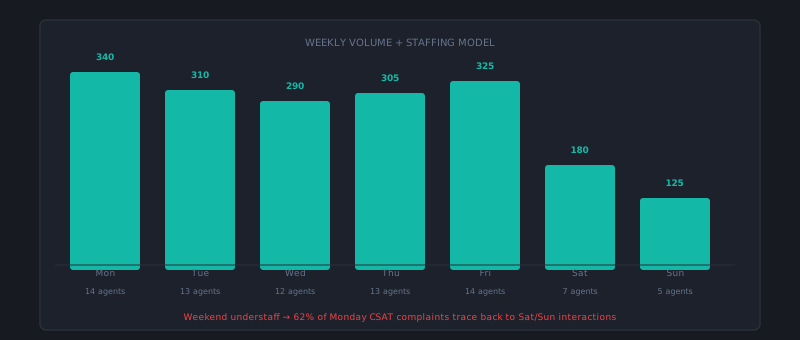
Support staffing is a matching problem: you need enough agents available at the times customers need help, without overstaffing the slow periods that follow every peak. Most teams solve this problem imprecisely — scheduling based on gut feel, reacting to volume spikes with emergency coverage, and oscillating between understaffed and overstaffed without a clear model.
Building a proper staffing model takes about two days of analysis work and significantly reduces both customer wait time and agent burnout once it’s in place.
Step 1: Build your volume baseline
You cannot staff correctly without knowing when your volume actually arrives. Pull a full year of ticket data (or at least 12 weeks if you’re newer) and aggregate it by hour of day and day of week.
What you’re looking for:
Intraday patterns: Most SaaS support operations peak in the mid-morning hours in their primary time zone (9am–12pm), dip slightly at lunch, have a secondary peak in early afternoon (1pm–3pm), and taper significantly after 4pm. The specific shape varies by customer base and product type.
Day-of-week patterns: Monday is almost universally the highest-volume day. Friday afternoon is typically the lowest. The gap between your highest and lowest days is usually 30–60%.
Monthly and seasonal patterns: B2B SaaS typically spikes at month-end (billing cycles, reporting deadlines), immediately after product releases, and at the start of the calendar year. Consumer support has different patterns. Map your specific seasonality.
The product release effect: Quantify how volume changes in the 72 hours after a product release. This is often a 30–80% spike that needs specific planning.
Build a simple heat map: days of week on one axis, hours of day on the other, ticket volume as the cell value. Color code it. The visual pattern tells you immediately where you need coverage and where you’re probably over-scheduled.
Step 2: Calculate coverage requirements
Converting volume into staffing requirements requires knowing your Average Handle Time and your target SLA.
The simplified Erlang calculation for staffing:
Required agents = (hourly ticket volume × AHT in hours) / (target utilization)
Where target utilization is typically 0.75–0.80 (you don’t want agents at 100% utilization — there’s no capacity for spikes).
Example: 45 tickets/hour at peak, 25-minute AHT, 80% target utilization: 45 × (25/60) / 0.80 = 23.4 → 24 agents needed at peak
Run this for each hour of the day using your volume baseline. You’ll get a staffing curve that shows how many agents you need hour by hour across the week. That curve is your staffing target.
Step 3: Design shifts that match the curve
Once you have a staffing requirement curve, you’re designing shifts to approximate it with real humans who have fixed start and end times.
Common shift structures for SaaS support:
Core shift model: All agents on a single shift that covers peak hours (typically 9am–6pm in the primary time zone). Simple to manage, maximizes per-agent efficiency, but provides no coverage outside core hours and concentrates risk on agent availability.
Staggered shift model: Agents start at different times (e.g., 7am, 9am, 11am, 1pm) to approximate the volume curve more closely. Some agents are always rolling off while others are arriving, matching the actual demand shape. Requires more scheduling sophistication but better coverage.
Follow-the-sun model: For global or near-24-hour coverage, agents in different time zones cover their regional business hours. No individual works outside normal hours; together the team has extended or continuous coverage.
On-call supplementation: A small on-call pool supplements the scheduled team during surges or covers nights and weekends at reduced staffing levels. Works well for lower-volume, occasional coverage needs rather than high-volume gaps.
Most growing teams start with core shifts, move to staggered once they have enough headcount to support it (typically 8+ agents), and add follow-the-sun when international ticket volume justifies it.
Step 4: Build coverage for predictable spikes
Predictable volume spikes — product releases, billing cycle peaks, marketing campaign launches — should have specific coverage plans, not emergency responses.
Two weeks before any predictable spike:
- Notify the team of the expected volume increase and its cause
- Confirm shift coverage for the affected days — is PTO scheduled that week? Is there flex capacity available?
- Pre-brief agents on the likely ticket types the spike will generate (feature questions after a release, billing questions at month-end)
- Confirm macro library is current for the spike-related topics
For product release spikes specifically, coordinate with engineering to get a heads-up on release timing and a summary of what changed. Agents who know what’s in the release can answer questions significantly faster than agents reading release notes for the first time while a customer waits.
Step 5: Monitor real-time staffing adherence
Staffing plans are only as good as adherence to them. Real-time monitoring tells you when actual coverage is diverging from plan.
Key real-time metrics for the shift supervisor:
- Agents logged in vs. agents scheduled: How many agents are actually available right now?
- Tickets in queue vs. target queue depth: Is the queue growing or shrinking?
- Current estimated wait time: If a ticket arrived now, how long before an agent would work it?
When staffing falls below plan (unexpected absence, late start), the supervisor needs to know immediately to decide whether to pull flex capacity, call in reinforcements, or accept a temporary SLA impact and communicate accordingly.
Handling unexpected spikes
Despite good planning, unexpected spikes happen — product incidents, viral social posts, third-party service failures. The key is having a playbook rather than improvising:
- Confirm the spike is real (not a data glitch) by checking arrival rate over the past 30 minutes
- Identify cause if possible — is it an outage? A product change? Knowing the source tells you which ticket types to expect
- Activate flex capacity — who can be pulled from non-ticket work immediately?
- Communicate to agents — what’s causing the spike, what ticket types they’ll see, any guidance on handling
- Communicate externally if warranted — if the spike is caused by an outage, a proactive status update deflects a significant portion of the volume
The spike playbook should be a written document, not institutional memory. New leads who’ve never seen a major spike should be able to run it.
Staffing support correctly is one of the most direct investments in customer experience you can make. Customers waiting two hours for a first response on a business-day morning aren’t waiting because the agent is slow — they’re waiting because there aren’t enough agents scheduled for that hour. Volume data and shift design fix that problem at the root. cx.aitocha.com provides volume forecast data broken down by hour and channel, which is the input your staffing model actually needs.