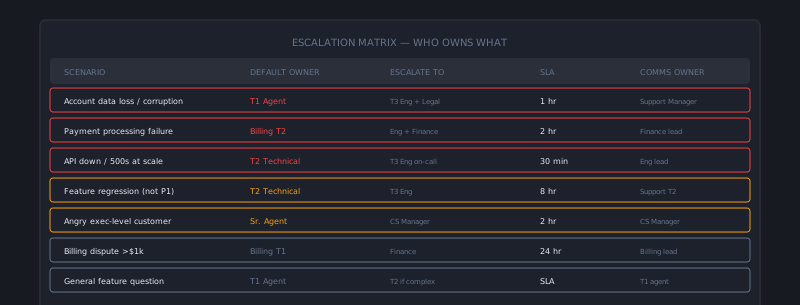
Most support teams have an escalation process. Fewer have an escalation matrix. And most of the ones that do have one tucked in a Confluence page that was updated 18 months ago and hasn’t been consulted since.
The gap between a documented escalation process and a functioning one is usually a design problem — escalation criteria that are too vague to apply in the moment, ownership assignments that have changed since the document was written, and no reinforcement mechanism that keeps the matrix front-of-mind for agents.
Here’s how to build one that actually gets followed.
What an escalation matrix needs to define
An escalation matrix answers four questions for every type of escalation scenario:
- When? What conditions trigger escalation — what specific signals tell an agent this ticket belongs above their level?
- Where? What queue, team, or individual does the ticket escalate to?
- How? What is the escalation mechanic — a tag, a queue transfer, a specific internal note format, a Slack ping?
- With what? What information must be included when escalating — what does the receiving team need to work the ticket effectively?
A matrix that answers all four questions unambiguously is one that agents can follow in real time without judgment calls. A matrix that says “escalate complex technical issues to Tier 2” doesn’t answer any of these questions usefully.
Structuring the matrix: scenarios, not categories
The most common structuring mistake is organizing the matrix by ticket category rather than by escalation trigger. A “Technical Escalation” section that lists when technical tickets go to Tier 2 misses all the non-technical reasons a ticket might need escalation (customer emotion, authority gaps, time sensitivity).
Organize by escalation scenario instead:
Scenario 1: Technical complexity beyond Tier 1 capability
- When: Agent cannot reproduce or diagnose the issue after standard troubleshooting, or the issue requires API log access, database records, or code-level investigation
- Where: Technical Tier 2 queue (
tech-tier2in helpdesk) - How: Apply tag
escalate-t2-tech, transfer to queue, add internal note using the T2 escalation template - What to include: Full reproduction steps, exact error messages or codes, account ID, affected feature, steps already attempted
Scenario 2: Billing authority limit exceeded
- When: Customer requests refund or credit above $50, or requests exception to billing policy outside agent authorization
- Where: Billing specialist queue (
billing-specialist) - How: Transfer ticket with internal note
- What to include: Refund amount requested, reason stated by customer, applicable charges, customer tier and LTV
Scenario 3: Customer requesting supervisor or manager
- When: Customer explicitly states “I want to speak with a manager” or equivalent
- Where: Team lead (assign to on-duty lead via
@leadtag) - How: Apply
supervisor-requesttag, assign to team lead, brief the lead before handoff if possible - What to include: Full summary of interaction to date, what the customer is upset about, any commitments already made
Scenario 4: Data loss or security incident
- When: Customer reports data loss, unauthorized account access, or suspected security breach
- Where: Immediately to team lead AND security response channel in Slack
- How: Tag
security-escalate, ping#security-incidentsin Slack, do NOT close or transfer the ticket yet - What to include: Verbatim customer description, account ID, timestamps of reported events, any error messages shared
Scenario 5: Enterprise SLA at risk
- When: Enterprise customer’s P1 or P2 ticket is approaching SLA breach without resolution in sight
- Where: Team lead + account manager notification
- How: Slack ping to team lead with ticket link, team lead evaluates and notifies AM if customer impact is significant
- What to include: Time remaining before breach, current status, what’s blocking resolution
This scenario-based structure is longer than a simple category table, but it gives agents the unambiguous guidance they need in the moment.
The escalation note template
Escalation quality is often the bottleneck in escalation cycle time. When a Tier 2 agent or specialist receives an escalation with no summary or minimal context, they spend the first 15–20 minutes re-reading the ticket, re-doing diagnosis steps that Tier 1 already did, and potentially reaching back to the customer for information they’d already provided. That’s time directly added to resolution.
A standardized escalation note template eliminates this. A good template for technical escalations:
ESCALATION SUMMARY
------------------
Issue: [One sentence describing the problem]
Customer impact: [Is anything broken? What can't they do?]
Severity: [P1/P2/P3]
Reproduction: [Exact steps to reproduce, if applicable]
Error messages: [Copy/paste exact error text or codes]
Already tried: [List troubleshooting steps already completed]
Account context: [Customer tier, contract, relevant account notes]
Expected next step: [What the agent expected to find or try next]
Making this template mandatory for technical escalations — enforced by a required internal note field before tier transfer is enabled — ensures context arrives with the ticket.
Keeping the matrix current
An escalation matrix is a living document. Team structure changes, new products are added, billing policies evolve, and the escalation paths need to reflect current reality. A matrix that was accurate 12 months ago and hasn’t been updated may be actively harmful — pointing tickets to queues that no longer exist or people who have moved to different roles.
Quarterly review is sufficient for most organizations. The review checklist:
- Are all queue names and routing destinations current?
- Are all named individuals (team leads, account managers) still in those roles?
- Have any new escalation scenarios emerged that aren’t covered?
- Are any existing scenarios generating unusual volume or misrouting?
Make one person explicitly responsible for matrix maintenance. Without ownership, it drifts.
Getting agents to actually use it
Documentation that lives in a wiki gets forgotten. Escalation criteria that are embedded in the agent’s workflow get followed.
Practical reinforcement mechanisms:
- QA scoring: Score escalation quality in your regular QA reviews. Did the agent escalate when they should have? Did they include the required information? This makes matrix adherence visible and measurable.
- Required fields before escalation: Configure your helpdesk to require specific fields (category, escalation reason, internal summary) before a transfer to a higher tier is allowed. This is a lightweight enforcement mechanism that doesn’t require supervisor oversight.
- Onboarding inclusion: Make the escalation matrix a required module in new agent onboarding with a practical exercise. New agents who practice applying the matrix in simulated scenarios internalize it faster than those who read it once.
- Debrief on notable escalations: When a significant escalation happens (P1 outage, angry enterprise customer, security incident), run a brief debrief in the team meeting: “Here’s what happened, here’s how the escalation was handled, here’s what went well and what could be faster next time.” Real examples stick.
A well-designed escalation matrix removes uncertainty from agents in high-pressure moments. That clarity is its primary value — not the document itself, but the confidence it gives agents to act quickly and correctly when something significant is happening. AItocha CX can encode your escalation matrix as routing rules, which removes the human judgment step for clear-cut cases.