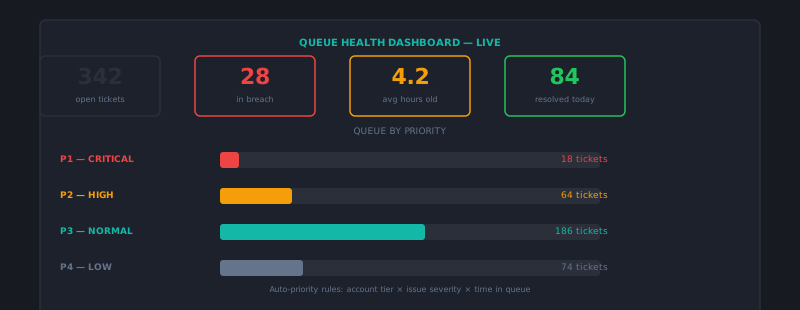
The support queue is where strategy meets reality. You can have excellent SLA policies, well-trained agents, and a solid helpdesk configuration — and still watch the queue spiral out of control during a volume spike if the queue management process itself isn’t designed well. This guide covers the mechanics of running a queue that stays healthy under normal conditions and recovers quickly under pressure.
Queue design before queue management
Before managing a queue, you need to design it. Most helpdesks allow multiple queues, and how you divide them significantly affects management overhead and agent efficiency.
Common queue architectures:
Single queue: All tickets in one queue, agents pull from it. Simple, maximizes throughput, easy to manage. Works well for small teams (under 8 agents) where skill differentiation is minimal.
Priority-based queues: Separate queues for P1/P2, P3/P4. Agents assigned to high-priority queues are always working the most urgent tickets. Works well when SLA compliance on high-severity tickets is your primary concern.
Channel-based queues: Separate queues for email, chat, phone. Allows staffing channel specialists and matching agent skill to channel preference. Works well in high-volume omnichannel environments.
Skill-based queues: Queues aligned to product areas or customer segments (enterprise vs. SMB, billing vs. technical). Reduces misrouting, improves resolution rates. Works well for teams with meaningful specialization.
For most SaaS support teams in the 10–30 agent range, a hybrid of priority and skill works best: a high-priority queue (P1/P2 everything) and skill-based queues for P3/P4 (billing, technical, general). This captures the urgency benefit without sacrificing routing intelligence.
Inbound routing: getting tickets to the right queue
Manual triage is the enemy of queue health. When agents or supervisors manually sort inbound tickets into queues, you introduce delay, inconsistency, and a bottleneck that gets worse under volume.
Build automated routing rules that handle 80–90% of routing decisions without human intervention:
Subject-line keyword routing: Tickets mentioning “down,” “outage,” “cannot access,” or “error [code]” route automatically to P1. Tickets mentioning “invoice,” “billing,” “charge,” “refund” route to billing queue.
Customer tier routing: Enterprise customers auto-route to enterprise queue or get priority assignment applied automatically. This ensures SLA commitments are visible from the moment a ticket arrives.
Inbound channel routing: Phone calls and live chats route differently from email — they have urgency by nature and need immediate assignment rather than queue waiting.
Product area detection: If your product has distinct modules and your customers tend to reference them by name, configure keyword matching on module names to route to the appropriate specialist queue.
Review your routing rules quarterly. Routing logic accumulates technical debt — new product features create new terminology that doesn’t match existing rules, customer tier definitions change, and specialist queues get restructured. Outdated routing is usually invisible until you audit it.
Assignment: pull vs. push
Once tickets are in the right queue, they need to reach the right agent. Two philosophies dominate:
Pull (agent-initiated): Agents pull their next ticket from the queue when they’re ready. This maximizes agent autonomy, adapts naturally to speed variation between agents, and prevents agents from holding tickets while working other things. The risk: agents cherry-pick easier tickets and avoid difficult ones.
Push (system-assigned): The helpdesk assigns tickets to agents automatically, often via round-robin or skill-based matching. This prevents cherry-picking and ensures equitable distribution. The risk: tickets get assigned to agents who are in a meeting, at lunch, or in the middle of a complex ticket — creating stale assignments that miss SLAs.
Most teams do better with a hybrid: push assignment on inbound, with a reclaim mechanism. Tickets are assigned automatically when they arrive, but agents can release tickets back to the queue if they’re not available, and leads have a visible “assigned but stale” view to reassign tickets approaching SLA breach.
Daily queue health monitoring
Queue management is a real-time discipline. A queue that was healthy at 9am can be critical by 11am if volume spiked unexpectedly. Team leads should monitor three numbers throughout the day:
Open queue size: The total number of unresolved tickets in the queue. Not as useful in isolation — what matters is whether it’s growing or shrinking and at what rate.
Breach rate: Percentage of tickets that breached SLA in the last 2 hours. Rising breach rate is the early warning signal that capacity is insufficient for current volume. By the time the absolute queue size looks alarming, you’re already behind.
Oldest open ticket: The age of the oldest unresolved ticket in the queue. Tickets that get lost — missed in a stale assignment, stuck in a specialist’s queue that nobody covers during PTO, or buried under new volume — often show up here before they cause customer complaints.
Review these three numbers at shift start, midday, and shift end. For P1 queues, monitor continuously.
Managing volume spikes
Volume spikes are inevitable. Product launches, outages, billing cycles, marketing emails — many predictable events generate predictable spikes. Manage them proactively:
Build a spike protocol. When queue size or breach rate exceeds defined thresholds, the protocol kicks in automatically: leads notify additional agents for coverage, overflow routing activates, and the non-critical specialist queues pause to focus agents on the priority queue.
Identify your flex capacity. Who are the agents who can be pulled from other work to cover support during a spike? This might be QA team members, support engineers, or team leads who stay capable of handling tickets. Having a flex capacity list and keeping it current means you’re not improvising when the spike hits.
Communicate proactively during outages. When a product issue is causing a ticket spike, a proactive status page update and customer email doesn’t just keep customers informed — it reduces ticket volume from customers checking in on the issue. Every customer who reads the status update instead of opening a ticket is load you don’t have to handle.
The weekly queue retrospective
Beyond daily monitoring, a 20-minute weekly queue review surfaces structural issues that daily metrics miss:
- Which ticket categories had the highest volume this week? Any new patterns?
- Where did SLA breaches concentrate — specific queues, agents, ticket categories?
- Were any tickets open longer than 5 days? Why?
- Did staffing match volume patterns? Where was the team overstaffed or understaffed?
This review is the feedback loop that makes queue management improve over time rather than just reacting to the same problems week after week.
A well-run support queue is ultimately about predictability — customers get a response in a time they can count on, agents work on an organized, prioritized set of problems, and leads see the operational picture clearly enough to intervene before small problems become crises.
AI-resolved tickets interact with queue health in ways worth understanding: when an AI layer handles the high-volume, low-complexity tickets before they reach the queue, the queue that remains is smaller and higher in complexity per ticket. Agents spend more time on problems worth their attention, and queue management becomes less about throughput and more about quality. AItocha CX is designed with this queue health dynamic in mind.